Theming
Every GUI window accepts a #theme parameter that controls the visual appearance of all widgets inside it. Graphix provides 22 built-in themes, plus two mechanisms for full customization: custom palettes and custom stylesheets.
Built-in Themes
The Theme type enumerates all available themes:
type Theme = [
  `Light,
  `Dark,
  `Dracula,
  `Nord,
  `SolarizedLight,
  `SolarizedDark,
  `GruvboxLight,
  `GruvboxDark,
  `CatppuccinLatte,
  `CatppuccinFrappe,
  `CatppuccinMacchiato,
  `CatppuccinMocha,
  `TokyoNight,
  `TokyoNightStorm,
  `TokyoNightLight,
  `KanagawaWave,
  `KanagawaDragon,
  `KanagawaLotus,
  `Moonfly,
  `Nightfly,
  `Oxocarbon,
  `Ferra,
  `Custom(StyleSheet),
  `CustomPalette(Palette)
];
Apply a theme by passing it to the window function:
window(#theme: &`CatppuccinMocha, &content)
Since #theme takes a &Theme, you can change the theme reactively:
let dark = true;
let theme = select dark {
  true => `Dark,
  false => `Light
};

window(#theme: &theme, &content)
Custom Palettes
For quick color customization without defining per-widget styles, use `CustomPalette with a Palette:
type Palette = {
  background: Color,
  danger: Color,
  primary: Color,
  success: Color,
  text: Color,
  warning: Color
};
The palette defines the core colors from which iced derives all widget styles automatically:
background– window and container backgrounds.text– default text color.primary– accent color for buttons, sliders, a toggled-on toggler, active elements.success– color for success states.danger– color for destructive actions and error states.warning– color for warning indicators.
use gui::{
  color, window,
  button::button,
  column::column,
  slider::slider,
  text::text,
  toggler::toggler
};
mod icon;

let enabled = true;
let br = 0.0;
let cv = |base| min(1.0, base + br);

let my_palette = {
  background: color(#r: cv(0.1), #g: cv(0.1), #b: cv(0.15))$,
  text:       color(#r: cv(0.9), #g: cv(0.9), #b: cv(0.95))$,
  primary:    color(#r: cv(0.4), #g: cv(0.6), #b: cv(1.0))$,
  success:    color(#r: cv(0.3), #g: cv(0.8), #b: cv(0.4))$,
  danger:     color(#r: cv(1.0), #g: cv(0.3), #b: cv(0.3))$,
  warning:    color(#r: cv(1.0), #g: cv(0.8), #b: cv(0.2))$
};

let col = column(
  #spacing: &15.0,
  #padding: &`All(30.0),
  #width: &`Fill,
  &[
    text(#size: &24.0, &"Custom Palette"),
    button(#on_press: |_| null, #padding: &`All(10.0), &text(&"Primary Button")),
    toggler(#label: &"Enabled", #on_toggle: |v| enabled <- v, &enabled),
    slider(#min: &0.0, #max: &0.5, #step: &0.05, #on_change: |v| br <- v, &br),
    text(&"Brightness: [br]")
  ]
);

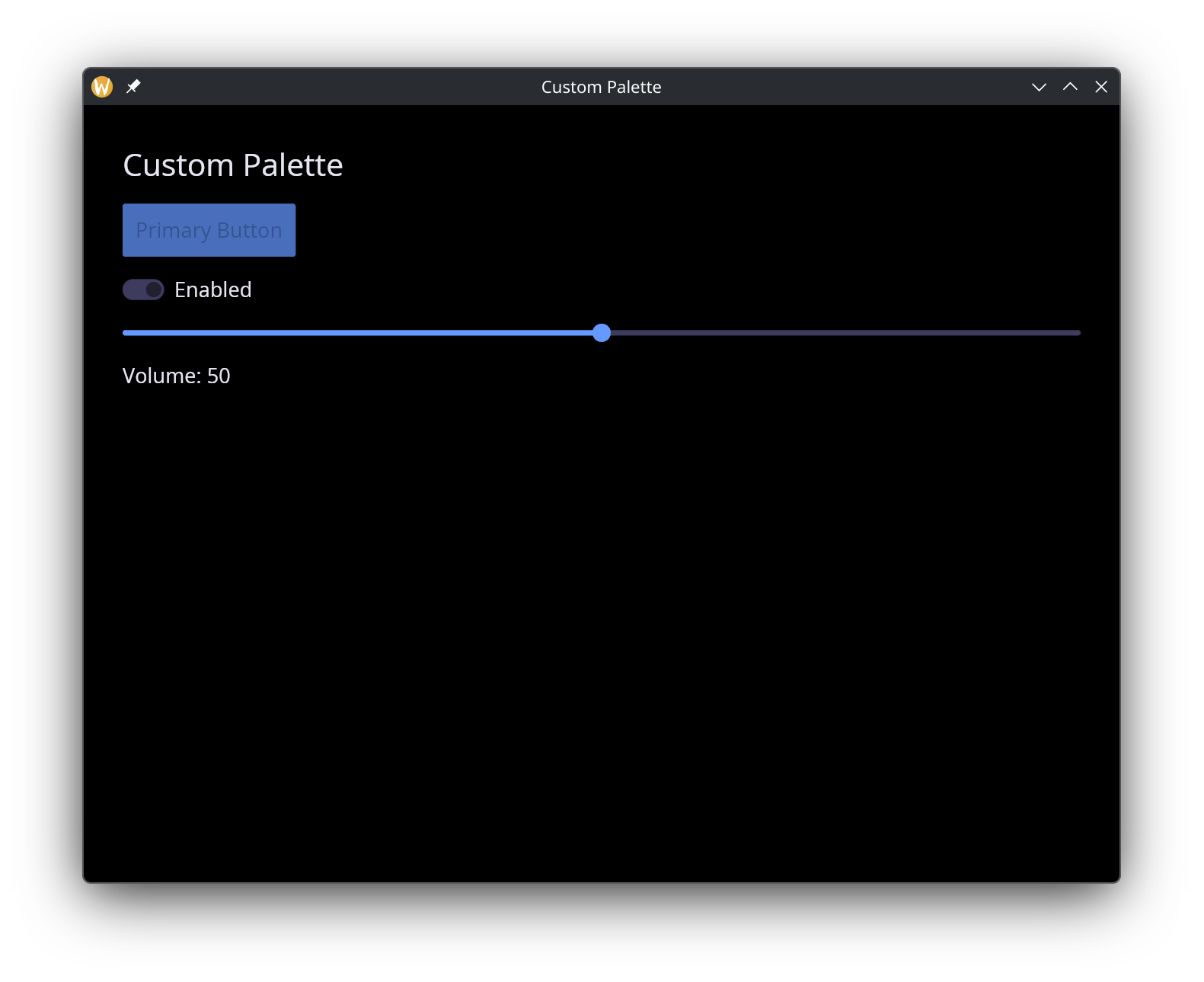
[&window(
  #icon: &icon::icon,
  #title: &"Custom Palette",
  #theme: &`CustomPalette(my_palette),
  &col
)]
Custom Stylesheets
For full control over individual widget appearances, use `Custom(StyleSheet). A stylesheet combines a palette with optional per-widget style overrides:
/// Full custom theme with optional per-widget style overrides
type StyleSheet = {
  button: [ButtonStyle, null],
  checkbox: [CheckboxStyle, null],
  container: [ContainerStyle, null],
  menu: [MenuStyle, null],
  palette: Palette,
  pick_list: [PickListStyle, null],
  progress_bar: [ProgressBarStyle, null],
  radio: [RadioStyle, null],
  rule: [RuleStyle, null],
  scrollable: [ScrollableStyle, null],
  slider: [SliderStyle, null],
  text_editor: [TextEditorStyle, null],
  text_input: [TextInputStyle, null],
  toggler: [TogglerStyle, null]
};
Every widget style field is optional (union with null). When null, the widget inherits its style from the palette automatically.
The stylesheet Builder
Use the stylesheet function to construct a StyleSheet without filling in every field manually. Only #palette is required; all widget style parameters default to null:
/// Build a full custom theme from a palette and optional per-widget styles.
/// Omitted widget styles default to the theme's built-in palette-derived style.
val stylesheet: fn(
  #palette: Palette,
  ?#button: [ButtonStyle, null],
  ?#checkbox: [CheckboxStyle, null],
  ?#container: [ContainerStyle, null],
  ?#menu: [MenuStyle, null],
  ?#pick_list: [PickListStyle, null],
  ?#progress_bar: [ProgressBarStyle, null],
  ?#radio: [RadioStyle, null],
  ?#rule: [RuleStyle, null],
  ?#scrollable: [ScrollableStyle, null],
  ?#slider: [SliderStyle, null],
  ?#text_editor: [TextEditorStyle, null],
  ?#text_input: [TextInputStyle, null],
  ?#toggler: [TogglerStyle, null]
) -> StyleSheet;
Example with a custom palette and button override:
use gui::{
  color, window,
  button::button,
  column::column,
  container::container,
  rule::horizontal_rule,
  slider::slider,
  style::{
    button_style, container_style, slider_style, stylesheet, text_input_style,
    toggler_style
  },
  text::text,
  text_input::text_input,
  toggler::toggler
};
mod icon;

let palette = {
  background: color(#r: 0.12, #g: 0.12, #b: 0.18)$,
  text:       color(#r: 0.85, #g: 0.85, #b: 0.9)$,
  primary:    color(#r: 0.55, #g: 0.35, #b: 0.95)$,
  success:    color(#r: 0.2, #g: 0.8, #b: 0.5)$,
  danger:     color(#r: 0.95, #g: 0.25, #b: 0.35)$,
  warning:    color(#r: 1.0, #g: 0.7, #b: 0.1)$
};

let theme = `Custom(stylesheet(
  #palette: palette,
  #button: button_style(
    #background: color(#r: 0.55, #g: 0.35, #b: 0.95)$,
    #text_color: color(#r: 1.0, #g: 1.0, #b: 1.0)$,
    #border_radius: 12.0
  ),
  #text_input: text_input_style(
    #background: color(#r: 0.16, #g: 0.16, #b: 0.24)$,
    #border_color: color(#r: 0.55, #g: 0.35, #b: 0.95, #a: 0.5)$,
    #border_radius: 8.0,
    #border_width: 2.0,
    #value_color: color(#r: 0.9, #g: 0.9, #b: 0.95)$,
    #placeholder_color: color(#r: 0.5, #g: 0.5, #b: 0.6)$
  ),
  #slider: slider_style(
    #rail_color: color(#r: 0.3, #g: 0.3, #b: 0.4)$,
    #rail_fill_color: color(#r: 0.55, #g: 0.35, #b: 0.95)$,
    #handle_color: color(#r: 0.7, #g: 0.55, #b: 1.0)$,
    #handle_radius: 8.0
  ),
  #toggler: toggler_style(
    #background: color(#r: 0.3, #g: 0.3, #b: 0.4)$,
    #foreground: color(#r: 0.85, #g: 0.85, #b: 0.9)$
  ),
  #container: container_style(
    #background: color(#r: 0.15, #g: 0.15, #b: 0.22)$,
    #border_color: color(#r: 0.55, #g: 0.35, #b: 0.95, #a: 0.3)$,
    #border_width: 1.0,
    #border_radius: 10.0
  )
));

let name = "";
let volume = 50.0;
let dark_mode = true;

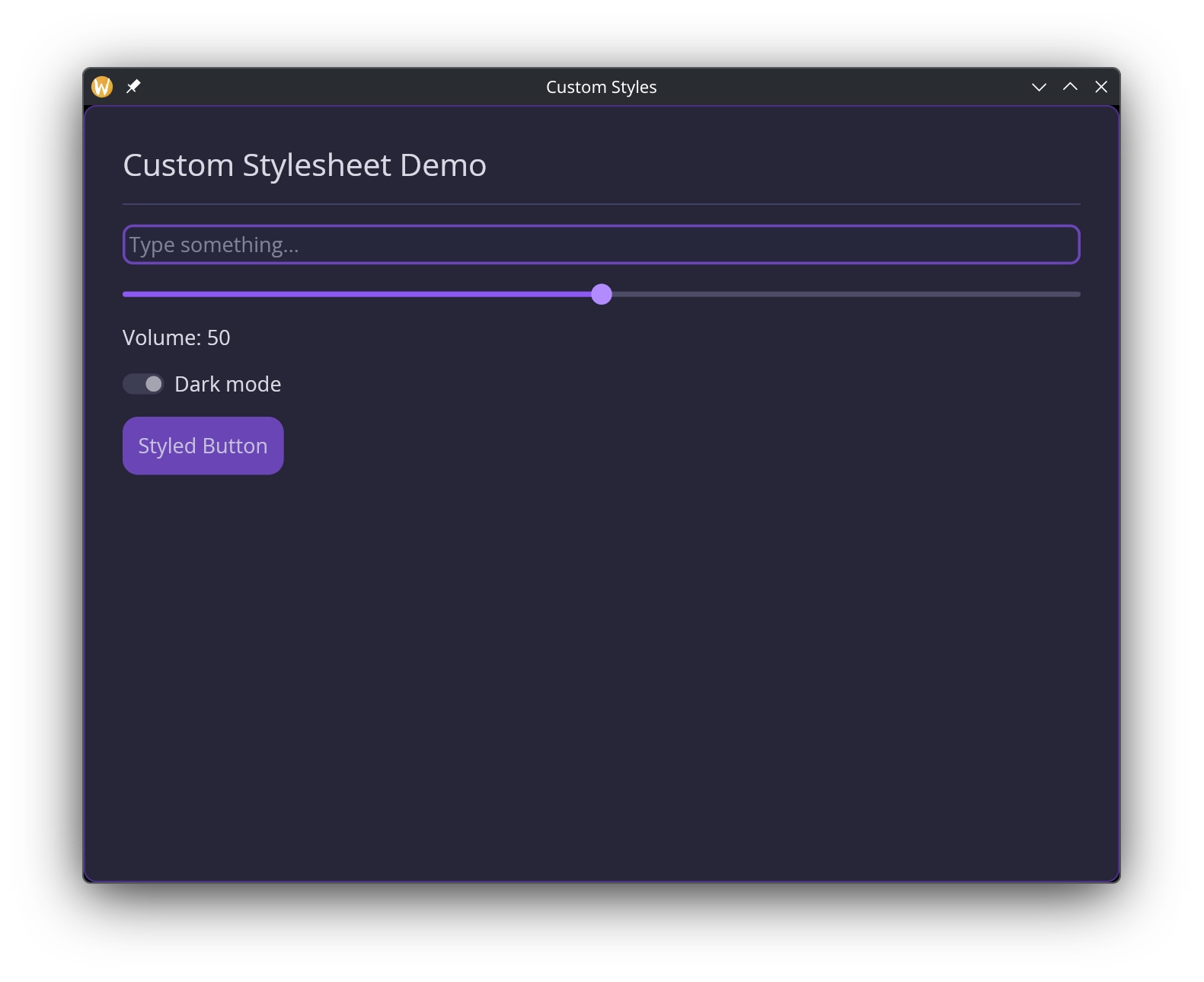
[&window(
  #icon: &icon::icon,
  #title: &"Custom Styles",
  #theme: &theme,
  &container(
    #padding: &`All(30.0),
    #width: &`Fill,
    #height: &`Fill,
    &column(
      #spacing: &15.0,
      #width: &`Fill,
      &[
        text(#size: &24.0, &"Custom Stylesheet Demo"),
        horizontal_rule(),
        text_input(
          #placeholder: &"Type something...",
          #on_input: |v| name <- v,
          &name
        ),
        slider(
          #min: &0.0, #max: &100.0,
          #on_change: |v| volume <- v,
          &volume
        ),
        text(&"Volume: [volume]"),
        toggler(
          #label: &"Dark mode",
          #on_toggle: |v| dark_mode <- v,
          &dark_mode
        ),
        button(#on_press: |_| null, #padding: &`All(12.0), &text(&"Styled Button"))
      ]
    )
  )
)]
Per-Widget Style Types
Each widget style type is a struct where every field is optional ([T, null]). A null field means “inherit from the theme palette.” The GUI module provides both the types and corresponding builder functions.
ButtonStyle
/// Per-widget style types for custom theming.
/// All fields are optional — null fields inherit the theme default.
type ButtonStyle = {
  background: [Color, null],
  border_color: [Color, null],
  border_radius: [f64, null],
  border_width: [f64, null],
  text_color: [Color, null]
};

/// Build a ButtonStyle with optional overrides
val button_style: fn(
  ?#background: [Color, null],
  ?#border_color: [Color, null],
  ?#border_radius: [f64, null],
  ?#border_width: [f64, null],
  ?#text_color: [Color, null]
) -> ButtonStyle;
TextInputStyle
type TextInputStyle = {
  background: [Color, null],
  border_color: [Color, null],
  border_radius: [f64, null],
  border_width: [f64, null],
  icon_color: [Color, null],
  placeholder_color: [Color, null],
  selection_color: [Color, null],
  value_color: [Color, null]
};

/// Build a TextInputStyle with optional overrides
val text_input_style: fn(
  ?#background: [Color, null],
  ?#border_color: [Color, null],
  ?#border_radius: [f64, null],
  ?#border_width: [f64, null],
  ?#icon_color: [Color, null],
  ?#placeholder_color: [Color, null],
  ?#selection_color: [Color, null],
  ?#value_color: [Color, null]
) -> TextInputStyle;
SliderStyle
type SliderStyle = {
  handle_border_color: [Color, null],
  handle_border_width: [f64, null],
  handle_color: [Color, null],
  handle_radius: [f64, null],
  rail_color: [Color, null],
  rail_fill_color: [Color, null],
  rail_width: [f64, null]
};

/// Build a SliderStyle with optional overrides
val slider_style: fn(
  ?#handle_border_color: [Color, null],
  ?#handle_border_width: [f64, null],
  ?#handle_color: [Color, null],
  ?#handle_radius: [f64, null],
  ?#rail_color: [Color, null],
  ?#rail_fill_color: [Color, null],
  ?#rail_width: [f64, null]
) -> SliderStyle;
Other Widget Styles
The remaining widget style types follow the same pattern – a struct of optional fields with a corresponding builder function:
| Type | Builder | Key Fields |
|---|---|---|
CheckboxStyle | checkbox_style | accent, background, border_color, border_radius, border_width, icon_color, text_color |
ContainerStyle | container_style | background, border_color, border_radius, border_width, text_color |
MenuStyle | menu_style | background, border_color, border_radius, border_width, selected_background, selected_text_color, text_color |
PickListStyle | pick_list_style | background, border_color, border_radius, border_width, handle_color, placeholder_color, text_color |
ProgressBarStyle | progress_bar_style | background, bar_color, border_radius |
RadioStyle | radio_style | background, border_color, border_width, dot_color, text_color |
RuleStyle | rule_style | color, fill_percent (the share of the container the line covers, 0 to 100), radius |
ScrollableStyle | scrollable_style | background, border_color, border_radius, border_width, scroller_color |
TextEditorStyle | text_editor_style | background, border_color, border_radius, border_width, placeholder_color, selection_color, value_color |
TogglerStyle | toggler_style | background, background_border_color, border_radius, foreground, foreground_border_color, text_color |
All builder functions accept the same labeled arguments as the corresponding struct fields, all optional, all defaulting to null.