The Layout Widget
The layout widget arranges child widgets in horizontal or vertical layouts with flexible sizing constraints. It’s the primary tool for organizing complex TUI interfaces and supports focus management for interactive applications.
Interface
use super::{Constraint, Direction, Flex, Size, Tui};
type Spacing = [
  `Space(i64),
  `Overlap(i64)
];

type Child = {
  child: Tui,
  constraint: Constraint,
  size: [&mut Size, null]
};

val child: fn(
  ?#size: [&mut Size, null],
  #constraint: Constraint,
  child: Tui
) -> Child;

type Layout = {
  children: &Array<Child>,
  direction: &[Direction, null],
  flex: &[Flex, null],
  focused: &[i64, null],
  horizontal_margin: &[i64, null],
  margin: &[i64, null],
  spacing: &[Spacing, null],
  vertical_margin: &[i64, null]
};

val layout: fn(
  ?#direction: &[Direction, null],
  ?#flex: &[Flex, null],
  ?#focused: &[i64, null],
  ?#horizontal_margin: &[i64, null],
  ?#margin: &[i64, null],
  ?#spacing: &[Spacing, null],
  ?#vertical_margin: &[i64, null],
  children: &Array<Child>
) -> Tui;
Parameters
- direction -
HorizontalorVertical(default:Vertical) - focused - Index of the currently focused child (0-indexed, the first when not set). Every event, keys and mouse alike, goes only to the focused child: an
input_handlerin another child hears nothing, and a click over another pane goes to the focused one - flex - How leftover space is distributed when children don’t fill it:
Legacy,Start,End,Center,SpaceBetween,SpaceEvenly,SpaceAround
Constraint Types
- Percentage(n) - Allocates n% of available space
- Length(n) - Fixed width/height in cells
- Min(n) - At least n cells
- Max(n) - At most n cells
- Ratio(num, den) - Fractional allocation (num/den)
- Fill(n) - Takes remaining space after other constraints
Examples
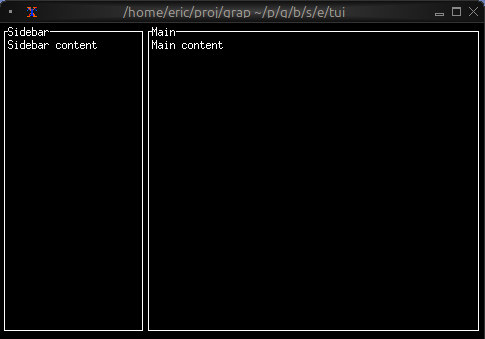
Basic Layout
use tui::{line, block::block, layout::{child, layout}, text::text};

let content1 = text(&"Sidebar content");
let content2 = text(&"Main content");

let sidebar = block(#border: &`All, #title: &line("Sidebar"), &content1);
let main = block(#border: &`All, #title: &line("Main"), &content2);

layout(
    #direction: &`Horizontal,
    &[
        child(#constraint: `Percentage(30), sidebar),
        child(#constraint: `Percentage(70), main)
    ]
)
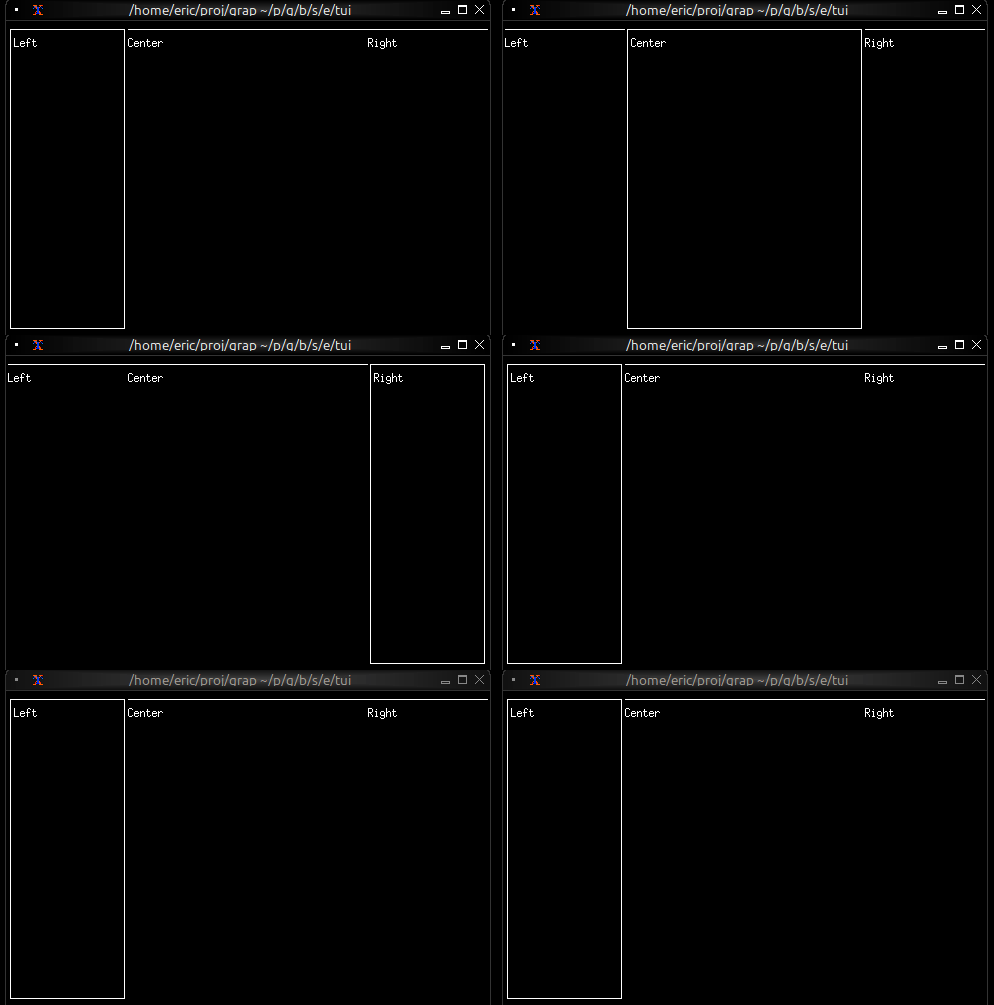
Three-Pane Layout with Focus
use tui::{
  block::block,
  input_handler::{Event, input_handler, on_press},
  layout::{child, layout},
  text::text
};

let focused = 0;

let handle_event = |e: Event| on_press(e, |k| select k.code {
    k@`Tab => {
        focused <- ((k ~ focused) + 1) % 3;
        `Stop
    },
    _ => `Continue
});

let focused_border = |i| select focused { n if n == i => `All, _ => [`Top] };
let left_pane = block(#border:&focused_border(0), &text(&"Left"));
let center_pane = block(#border:&focused_border(1), &text(&"Center"));
let right_pane = block(#border:&focused_border(2), &text(&"Right"));

input_handler(
    #handle: &handle_event,
    &layout(
        #direction: &`Horizontal,
        #focused: &focused,
        &[
            child(#constraint: `Percentage(25), left_pane),
            child(#constraint: `Percentage(50), center_pane),
            child(#constraint: `Percentage(25), right_pane)
        ]
    )
)
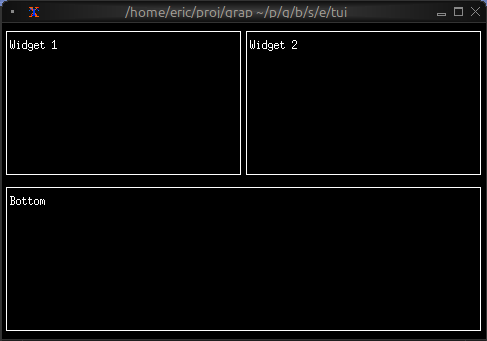
Nested Layouts
use tui::{block::block, layout::{child, layout}, text::text};

let widget1 = block(#border:&`All, &text(&"Widget 1"));
let widget2 = block(#border:&`All, &text(&"Widget 2"));
let bottom_widget = block(#border:&`All, &text(&"Bottom"));

let top_row = layout(
    #direction: &`Horizontal,
    &[
        child(#constraint: `Percentage(50), widget1),
        child(#constraint: `Percentage(50), widget2)
    ]
);

layout(
    #direction: &`Vertical,
    &[
        child(#constraint: `Percentage(50), top_row),
        child(#constraint: `Percentage(50), bottom_widget)
    ]
)
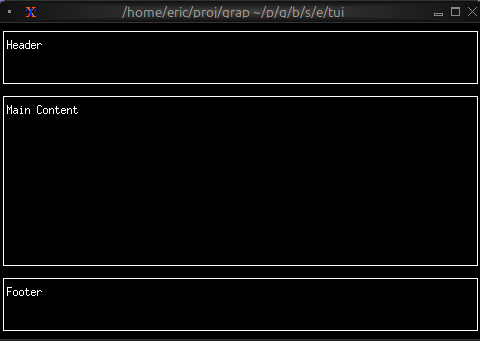
Header/Content/Footer
use tui::{block::block, layout::{child, layout}, text::text};

let header = block(#border:&`All, &text(&"Header"));
let content = block(#border:&`All, &text(&"Main Content"));
let footer = block(#border:&`All, &text(&"Footer"));

layout(
    #direction: &`Vertical,
    &[
        child(#constraint: `Percentage(20), header),
        child(#constraint: `Fill(1), content),
        child(#constraint: `Percentage(20), footer)
    ]
)
Nested Layout with Focus and Scrolling
Nested layouts whose focused pane is highlighted, with a long paragraph scrolled beside a scrollbar.
use tui::{
line, style,
block::block,
input_handler::{Event, input_handler, on_press},
layout::{child, layout},
paragraph::paragraph,
scrollbar::scrollbar,
text::text
};
let long_text = str::join(#sep: " ", array::init(50, |i| "[i + 1] I've got a lovely bunch of coconuts ... all lined up in a row. Big ones small ones, some the size of your head!"));
let max_scroll = 150;
let focused = 0;
let block1 = block(
#border:&`All,
#border_style: &style(#fg: select focused { f if f == 0 => `Red, _ => `Yellow }),
#title: &line("block 1"),
&text(&"hello layout world!")
);
let block2l = block(
#border:&`All,
#border_style: &style(#fg: `Cyan),
#title: &line("block 2l"),
&text(&"hello again layout world!")
);
let block2r = block(
#border:&`All,
#border_style: &style(#fg: `Cyan),
#title: &line("block 2r"),
&text(&"hello again layout world!")
);
let block2rem = block(
#border:&`All,
#border_style: &style(#fg: `Yellow),
#title: &line("Content!"),
&{
let position = 0;
let handle_event = |e: Event| on_press(e, |k| select k.code {
k@`Up if position > 0 => {
position <- (k ~ position) - 1;
`Stop
},
k@`Down if position < max_scroll => {
position <- (k ~ position) + 1;
`Stop
},
_ => `Continue
});
input_handler(
#handle: &handle_event,
&scrollbar(
#position: &position,
#content_length:&max_scroll,
¶graph(#scroll: &{x: 0, y: position}, &long_text)
)
)
}
);
let block2_layout = layout(
#direction: &`Horizontal,
#focused: &2,
&[
child(#constraint:`Percentage(25), block2l),
child(#constraint:`Percentage(25), block2r),
child(#constraint:`Percentage(50), block2rem)
]
);
let block2 = block(
#border:&`All,
#border_style: &style(#fg: select focused { f if f == 1 => `Red, _ => `Yellow }),
#title: &line("block 2"),
&block2_layout
);
let handle_event = |e: Event| on_press(e, |k| select k.code {
k@`Tab => {
focused <- ((k ~ focused) + 1) % 2;
`Stop
},
_ => `Continue
});
input_handler(
#handle: &handle_event,
&layout(#focused: &focused, &[
child(#constraint:`Percentage(50), block1),
child(#constraint:`Percentage(50), block2)
])
)
See Also
- block - Common child widget for layouts
- input_handler - For handling focus changes