The Layout Widget
The layout widget arranges child widgets in horizontal or vertical layouts with flexible sizing constraints. It’s the primary tool for organizing complex TUI interfaces and supports focus management for interactive applications.
Interface
type Spacing = [
  `Space(i64),
  `Overlap(i64)
];

type Child = {
  child: Tui,
  constraint: Constraint,
  size: &[Size, null]
};

val child: fn(
  ?#size: &[Size, null],
  #constraint: Constraint,
  Tui
) -> Child;

val layout: fn(
  ?#direction: &[Direction, null],
  ?#flex: &[Flex, null],
  ?#focused: &[i64, null],
  ?#horizontal_margin: &[i64, null],
  ?#margin: &[i64, null],
  ?#spacing: &[Spacing, null],
  ?#vertical_margin: &[i64, null],
  &Array<Child>
) -> Tui;
Parameters
- direction -
HorizontalorVertical(default:Vertical) - focused - Index of the currently focused child (0-indexed)
- flex - Alignment when children don’t fill space:
Start,Center,End,SpaceAround,SpaceBetween
Constraint Types
- Percentage(n) - Allocates n% of available space
- Length(n) - Fixed width/height in cells
- Min(n) - At least n cells
- Max(n) - At most n cells
- Ratio(num, den) - Fractional allocation (num/den)
- Fill(n) - Takes remaining space after other constraints
Examples
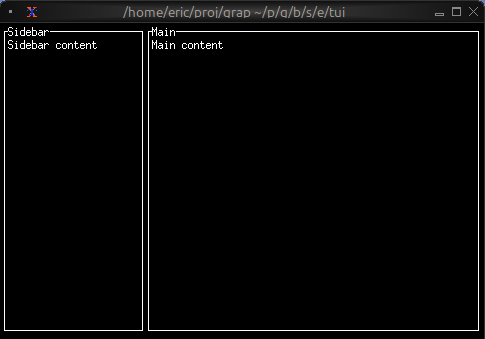
Basic Layout
use tui;
use tui::layout;
use tui::block;
use tui::text;

let content1 = text(&"Sidebar content");
let content2 = text(&"Main content");

let sidebar = block(#border: &`All, #title: &line("Sidebar"), &content1);
let main = block(#border: &`All, #title: &line("Main"), &content2);

layout(
    #direction: &`Horizontal,
    &[
        child(#constraint: `Percentage(30), sidebar),
        child(#constraint: `Percentage(70), main)
    ]
)
Three-Pane Layout with Focus
use tui;
use tui::layout;
use tui::text;
use tui::input_handler;
use tui::block;

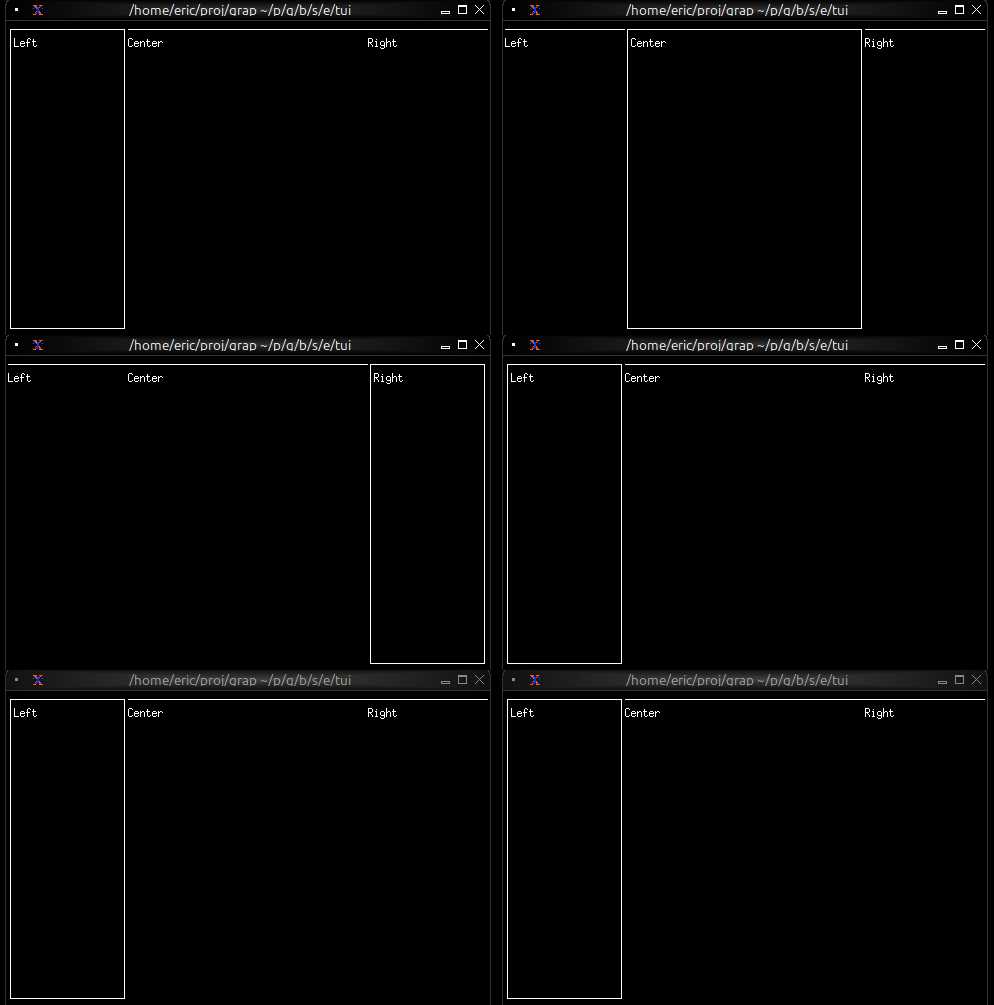
let focused = 0;

let handle_event = |e: Event| -> [`Stop, `Continue] select e {
    `Key(k) => select k.kind {
        `Press => select k.code {
            k@`Tab => {
                focused <- ((k ~ focused) + 1) % 3;
                `Stop
            },
            _ => `Continue
        },
        _ => `Continue
    },
    _ => `Continue
};

let focused_border = |i| select focused { n if n == i => `All, _ => [`Top] };
let left_pane = block(#border:&focused_border(0), &text(&"Left"));
let center_pane = block(#border:&focused_border(1), &text(&"Center"));
let right_pane = block(#border:&focused_border(2), &text(&"Right"));

input_handler(
    #handle: &handle_event,
    &layout(
        #direction: &`Horizontal,
        #focused: &focused,
        &[
            child(#constraint: `Percentage(25), left_pane),
            child(#constraint: `Percentage(50), center_pane),
            child(#constraint: `Percentage(25), right_pane)
        ]
    )
)
Nested Layouts
use tui;
use tui::layout;
use tui::text;
use tui::block;

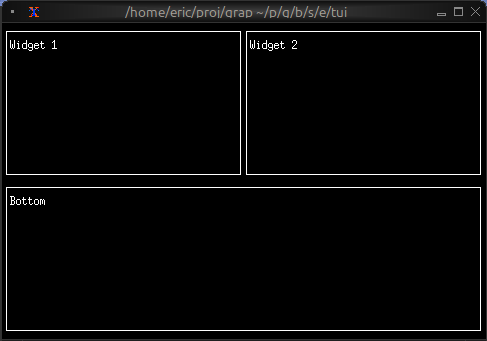
let widget1 = block(#border:&`All, &text(&"Widget 1"));
let widget2 = block(#border:&`All, &text(&"Widget 2"));
let bottom_widget = block(#border:&`All, &text(&"Bottom"));

let top_row = layout(
    #direction: &`Horizontal,
    &[
        child(#constraint: `Percentage(50), widget1),
        child(#constraint: `Percentage(50), widget2)
    ]
);

layout(
    #direction: &`Vertical,
    &[
        child(#constraint: `Percentage(50), top_row),
        child(#constraint: `Percentage(50), bottom_widget)
    ]
)
Header/Content/Footer
use tui;
use tui::layout;
use tui::text;
use tui::block;

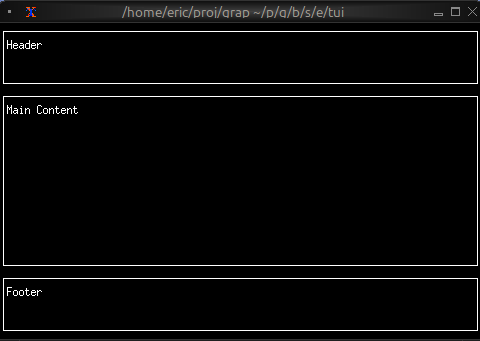
let header = block(#border:&`All, &text(&"Header"));
let content = block(#border:&`All, &text(&"Main Content"));
let footer = block(#border:&`All, &text(&"Footer"));

layout(
    #direction: &`Vertical,
    &[
        child(#constraint: `Percentage(20), header),
        child(#constraint: `Fill(1), content),
        child(#constraint: `Percentage(20), footer)
    ]
)
See Also
- block - Common child widget for layouts
- input_handler - For handling focus changes