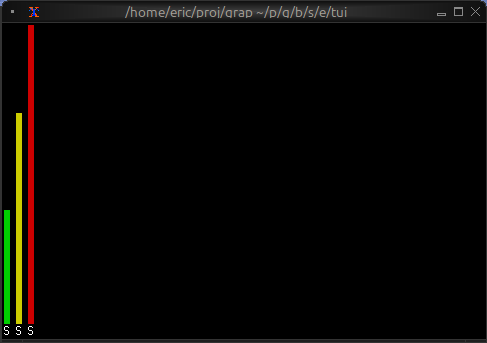
The Bar Chart Widget
The bar_chart widget displays categorical data as bars, vertical by default (#direction: &`Horizontal lays them out sideways), supporting grouped bars, custom styling, and dynamic updates. It’s ideal for comparing values across categories, showing rankings, or displaying resource usage.
Interface
use super::{Direction, Line, Style, Tui};
type Bar = {
  label: &[Line, null],
  style: &[Style, null],
  text_value: &[string, null],
  value: &i64,
  value_style: &[Style, null]
};

val bar: fn(
  ?#label: &[Line, null],
  ?#style: &[Style, null],
  ?#text_value: &[string, null],
  ?#value_style: &[Style, null],
  value: &i64
) -> Bar;

type BarGroup = {
  bars: Array<Bar>,
  label: [Line, null]
};

val bar_group: fn(
  ?#label: [Line, null],
  bars: Array<Bar>
) -> BarGroup;

type BarChart = {
  bar_gap: &[i64, null],
  bar_style: &[Style, null],
  bar_width: &[i64, null],
  data: &Array<BarGroup>,
  direction: &[Direction, null],
  group_gap: &[i64, null],
  label_style: &[Style, null],
  max: &[i64, null],
  style: &[Style, null],
  value_style: &[Style, null]
};

val bar_chart: fn(
  ?#bar_gap: &[i64, null],
  ?#bar_style: &[Style, null],
  ?#bar_width: &[i64, null],
  ?#direction: &[Direction, null],
  ?#group_gap: &[i64, null],
  ?#label_style: &[Style, null],
  ?#max: &[i64, null],
  ?#style: &[Style, null],
  ?#value_style: &[Style, null],
  data: &Array<BarGroup>
) -> Tui;
Parameters
bar_chart
- max - Maximum value for chart scale (auto-scales if not specified)
- bar_width - Width of each bar in characters
- bar_gap - Space between bars within a group
- group_gap - Space between bar groups
- style - Base style for the chart
- direction -
`Vertical(the default) or`Horizontal - bar_style - Default style for every bar
- label_style - Style for the bar and group labels
- value_style - Default style for the values drawn on the bars
bar_group
- label - Line labeling the group (displayed below bars)
bar
- style - Style for the bar
- label - Line labeling the bar
- text_value - String displayed above the bar (defaults to the numeric value)
- value_style - Style for this bar’s value
Examples
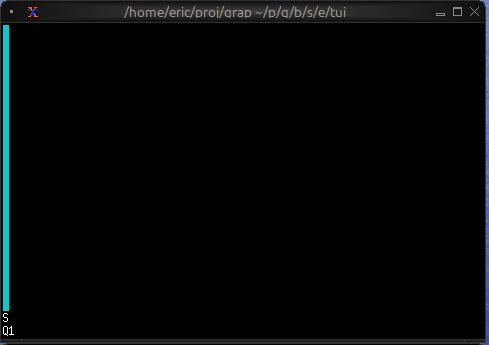
Basic Usage
use tui::{line, style, barchart::{bar, bar_chart, bar_group}};

let bar1 = bar(
    #style: &style(#fg: `Cyan),
    #label: &line("Sales"),
    &42
);

bar_chart(&[bar_group(#label: line("Q1"), [bar1])])
Grouped Bars with Dynamic Data
use tui::{line, style, barchart::{bar, bar_chart, bar_group}, block::block};
use rand::rand;

let clock = sys::time::timer(duration:0.7s, true);

let group0 = [
    bar(#style: &style(#fg: `Red), #label: &line("CPU"), &rand(#start:0, #end:100, #clock)),
    bar(#style: &style(#fg: `Yellow), #label: &line("Memory"), &rand(#start:25, #end:200, #clock))
];

let group1 = [
    bar(#style: &style(#fg: `Cyan), #label: &line("Network"), &rand(#start:0, #end:50, #clock)),
    bar(#style: &style(#fg: `Magenta), #label: &line("Disk"), &rand(#start:1, #end:25, #clock))
];

let chart = bar_chart(
    #bar_gap: &2,
    #bar_width: &8,
    #max: &200,
    &[
        bar_group(#label: line("Server 1"), group0),
        bar_group(#label: line("Server 2"), group1)
    ]
);

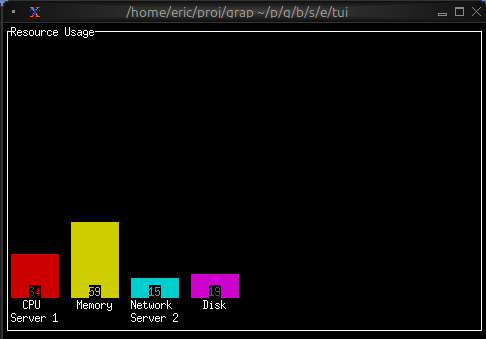
block(#border: &`All, #title: &line("Resource Usage"), &chart)
Color-coded Values
use tui::{line, style, barchart::{bar, bar_chart, bar_group}};

let make_colored_bar = |label, value| {
    let color = select value {
        v if v > 80 => `Red,
        v if v > 50 => `Yellow,
        _ => `Green
    };
    bar(#style: &style(#fg: color), #label: &line(label), &value)
};

let bars = [
    make_colored_bar("Service A", 35),
    make_colored_bar("Service B", 65),
    make_colored_bar("Service C", 92)
];

bar_chart(&[bar_group(bars)])