The Calendar Widget
The calendar widget displays a monthly calendar view with support for highlighting specific dates and displaying events. It displays dates and takes no input, which suits schedules, event views, and time-based visualizations.
Interface
use super::{Style, Tui};
type Date = {
  year: i64,
  month: i64,
  day: i64
};

val date: fn(year: i64, month: i64, day: i64) -> Date;

type CalendarEvent = {
  date: Date,
  style: Style
};

val calendar_event: fn(style: Style, date: Date) -> CalendarEvent;

type Calendar = {
  default_style: &[Style, null],
  display_date: &Date,
  events: &[Array<CalendarEvent>, null],
  show_month: &[Style, null],
  show_surrounding: &[Style, null],
  show_weekday: &[Style, null]
};

val calendar: fn(
  ?#default_style: &[Style, null],
  ?#show_month: &[Style, null],
  ?#show_surrounding: &[Style, null],
  ?#show_weekday: &[Style, null],
  ?#events: &[Array<CalendarEvent>, null],
  display_date: &Date
) -> Tui;
Parameters
calendar
- show_month - Style for the month header
- show_weekday - Style for weekday headers (Mon, Tue, etc.)
- show_surrounding - Style for dates from surrounding months
- events - Array of CalendarEvent objects to highlight dates
calendar_event
Takes a style and a date to create an event marker.
date
Creates a date with year, month (1-12), and day (1-31).
Examples
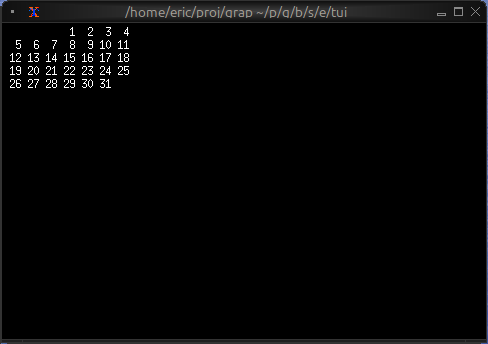
Basic Usage
use tui::calendar::{calendar, date};
let current_date = date(2024, 5, 15);
calendar(¤t_date)
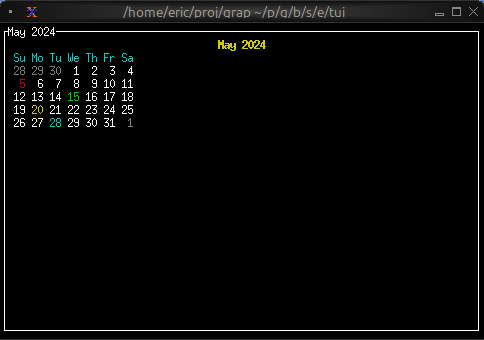
Event Calendar
use tui::{line, style, block::block, calendar::{calendar, calendar_event, date}};

let today = date(2024, 5, 15);

let events = [
    calendar_event(style(#fg: `Red), date(2024, 5, 5)),
    calendar_event(style(#fg: `Green), date(2024, 5, 15)),
    calendar_event(style(#fg: `Yellow), date(2024, 5, 20)),
    calendar_event(style(#fg: `Cyan), date(2024, 5, 28))
];

block(
    #border: &`All,
    #title: &line("May 2024"),
    &calendar(
        #show_month: &style(#fg: `Yellow, #add_modifier: [`Bold]),
        #show_weekday: &style(#fg: `Cyan),
        #show_surrounding: &style(#fg: `DarkGray),
        #events: &events,
        &today
    )
)
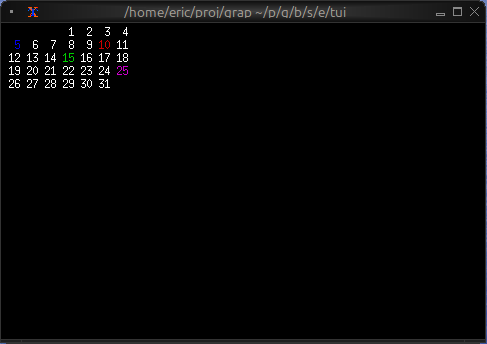
Color-coded Events by Type
use tui::{style, calendar::{Date, calendar, calendar_event, date}};

type EventType = [`Meeting, `Deadline, `Holiday, `Birthday];
type CalendarEntry = {date: Date, event_type: EventType};

let entries: Array<CalendarEntry> = [
    {date: date(2024, 5, 5), event_type: `Meeting},
    {date: date(2024, 5, 10), event_type: `Deadline},
    {date: date(2024, 5, 15), event_type: `Holiday},
    {date: date(2024, 5, 25), event_type: `Birthday}
];

let color_of = |t: EventType| select t {
    `Meeting => `Blue,
    `Deadline => `Red,
    `Holiday => `Green,
    `Birthday => `Magenta
};
let events = array::map(entries, |e| calendar_event(style(#fg: color_of(e.event_type)), e.date));

calendar(#events: &events, &date(2024, 5, 1))