Menus
The menu module provides menu bars and context menus. Both are built from the same MenuItem building blocks — actions (clickable items with optional keyboard shortcuts) and dividers.
Interface
use super::{Length, Widget};
/// A keyboard shortcut combining modifier keys with a character key.
type Shortcut;

/// Create a keyboard shortcut. Key must be exactly one character (e.g. "N", "S").
/// Returns an error for invalid keys.
val shortcut: fn(
  ?#ctrl: bool,
  ?#shift: bool,
  ?#alt: bool,
  ?#logo: bool,
  key: string
) -> [Shortcut, Error<`InvalidKey(string)>];

type MenuAction = {
  label: &string,
  shortcut: &[Shortcut, null],
  on_click: &[fn(e: null) -> Any, null],
  disabled: &bool
};

type MenuItem = [`Action(MenuAction), `Divider];

type MenuGroup = {
  label: &string,
  items: &Array<MenuItem>
};

type MenuBar = {
  menus: &Array<MenuGroup>,
  width: &Length
};

val action: fn(
  ?#on_click: [fn(e: null) -> Any, null],
  ?#shortcut: &[Shortcut, null],
  ?#disabled: &bool,
  label: &string
) -> MenuItem;

val divider: fn() -> MenuItem;

val menu: fn(label: &string, items: &Array<MenuItem>) -> MenuGroup;

type ContextMenu = { child: &Widget, items: &Array<MenuItem> };

val context_menu: fn(items: &Array<MenuItem>, child: &Widget) -> Widget;

val bar: fn(?#width: &Length, menus: &Array<MenuGroup>) -> Widget
menu::shortcut
Creates a keyboard shortcut from modifier flags and a single character key; any one character, é or € included. Matching accepts the unmodified key or the character produced by Shift or AltGr, ignoring letter case. The modifier flags must still match: for example, use #ctrl: true, #shift: true with "?" for Ctrl+Shift+? on a US layout.
#ctrl– Hold Ctrl. Defaults tofalse.#shift– Hold Shift. Defaults tofalse.#alt– Hold Alt. Defaults tofalse.#logo– Hold the logo/super key. Defaults tofalse.- positional
string– A single character (e.g."N","Z"). Returns an error if the key is not exactly one character.
The shortcut text (e.g. “Ctrl+N”) is displayed right-aligned in dimmed text next to the menu item label. In a menu bar, pressing the key combination triggers the action anywhere in the window. In a context menu it triggers the action while that menu is open: several rows may carry the same context menu, and a closed one has no row to act on.
menu::action Parameters
#on_click– Callback invoked when the action is clicked. Receivesnull. If omitted, the action is displayed but does nothing.#shortcut– AShortcutvalue created bymenu::shortcut(...). The shortcut text is shown right-aligned in the menu and the key combination triggers the action.nullfor no shortcut.#disabled– Whentrue, the action is grayed out and#on_clickis not triggered. Defaults tofalse.- positional
&string– The label text for this menu action.
menu::divider
Takes no arguments. Returns a horizontal separator line between menu items.
menu::menu
Groups a list of menu items under a label that appears in the menu bar.
- positional
&string– The label shown in the menu bar (e.g."File","Edit"). - positional
&Array<MenuItem>– The items in this dropdown menu.
menu::bar Parameters
#width– Width of the menu bar. AcceptsLengthvalues. Defaults to`Shrink.- positional
&Array<MenuGroup>– The menu groups to display in the bar.
menu::context_menu
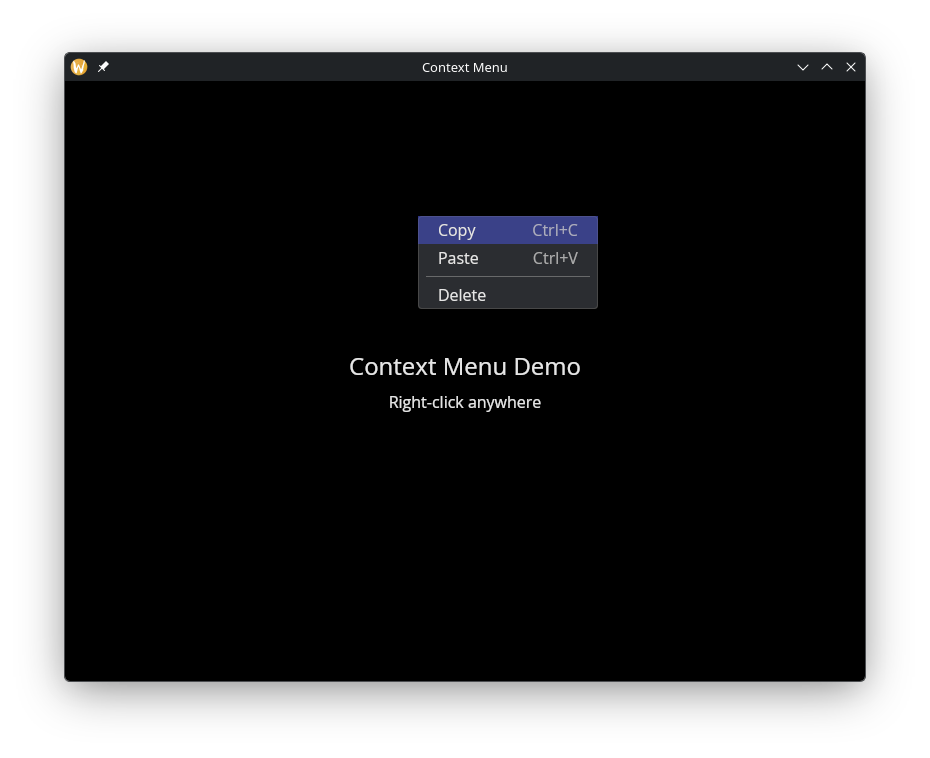
Wraps any widget and shows a dropdown menu on right-click. Reuses the same MenuItem type as the menu bar.
- positional
&Array<MenuItem>– The items to display in the context menu. - positional
&Widget– The child widget. Right-clicking anywhere on this widget opens the menu at the cursor position.
The menu closes when an item is clicked, when the user clicks outside it, or when Escape is pressed.
Examples
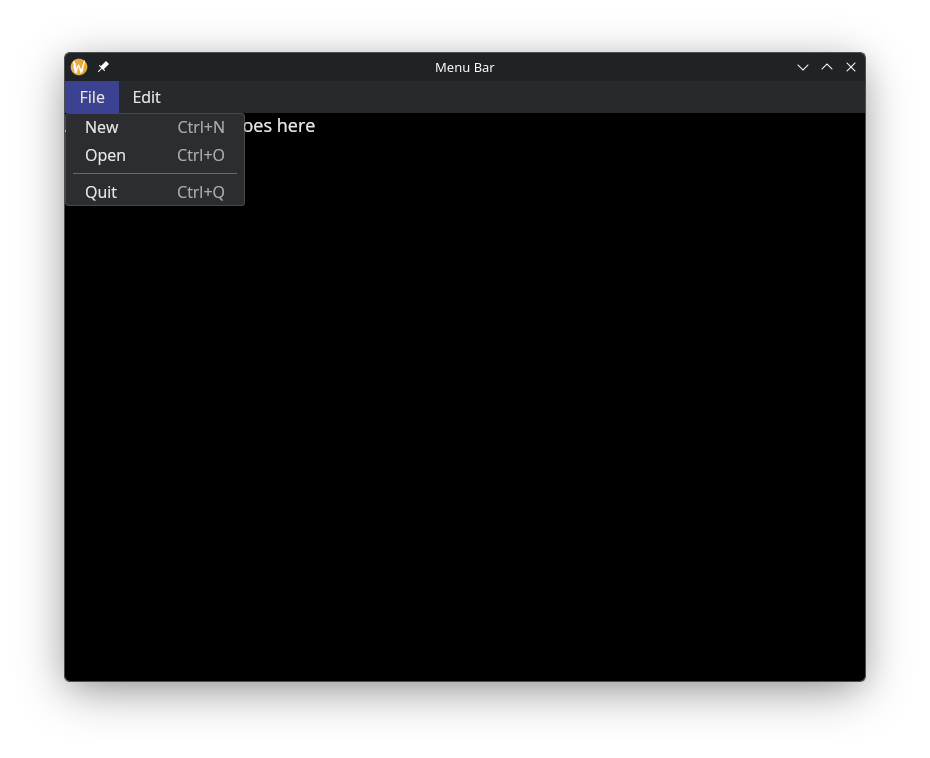
Menu Bar
use gui::{window, column::column, menu, text::text};
mod icon;

let file_menu = menu::menu(
    &"File",
    &[
        menu::action(
            #on_click: |v| println(v ~ "New file"),
            #shortcut: &menu::shortcut(#ctrl: true, "N")$,
            &"New"
        ),
        menu::action(
            #on_click: |v| println(v ~ "Open file"),
            #shortcut: &menu::shortcut(#ctrl: true, "O")$,
            &"Open"
        ),
        menu::divider(),
        menu::action(
            #on_click: |v| println(v ~ "Quit"),
            #shortcut: &menu::shortcut(#ctrl: true, "Q")$,
            &"Quit"
        )
    ]
);

let edit_menu = menu::menu(
    &"Edit",
    &[
        menu::action(
            #on_click: |v| println(v ~ "Undo"),
            #shortcut: &menu::shortcut(#ctrl: true, "Z")$,
            &"Undo"
        ),
        menu::action(
            #on_click: |v| println(v ~ "Redo"),
            #shortcut: &menu::shortcut(#ctrl: true, #shift: true, "Z")$,
            &"Redo"
        ),
        menu::divider(),
        menu::action(
            #on_click: |v| println(v ~ "Copy"),
            #shortcut: &menu::shortcut(#ctrl: true, "C")$,
            &"Copy"
        ),
        menu::action(
            #on_click: |v| println(v ~ "Paste"),
            #shortcut: &menu::shortcut(#ctrl: true, "V")$,
            &"Paste"
        )
    ]
);

let layout = column(
    #width: &`Fill,
    &[
        menu::bar(#width: &`Fill, &[file_menu, edit_menu]),
        text(#size: &18.0, &"Application content goes here")
    ]
);

[&window(#icon: &icon::icon, #title: &"Menu Bar", &layout)]
Context Menu
use gui::{window, column::column, container::container, menu, text::text};
mod icon;

let status = "Right-click anywhere";

let items = [
    menu::action(
        #on_click: |v| status <- v ~ "Copied!",
        #shortcut: &menu::shortcut(#ctrl: true, "C")$,
        &"Copy"
    ),
    menu::action(
        #on_click: |v| status <- v ~ "Pasted!",
        #shortcut: &menu::shortcut(#ctrl: true, "V")$,
        &"Paste"
    ),
    menu::divider(),
    menu::action(
        #on_click: |v| status <- v ~ "Deleted!",
        &"Delete"
    )
];

let content = container(
    #halign: &`Center,
    #valign: &`Center,
    #width: &`Fill,
    #height: &`Fill,
    &column(
        #halign: &`Center,
        #spacing: &10.0,
        &[
            text(#size: &24.0, &"Context Menu Demo"),
            text(&status)
        ]
    )
);

[&window(
    #icon: &icon::icon,
    #title: &"Context Menu",
    &menu::context_menu(&items, &content)
)]
See Also
- button – for standalone clickable actions
- keyboard_area – for capturing keyboard shortcuts
- mouse_area – for general mouse event handling