The QR Code Widget
Encodes a string as a QR code image. The QR code updates reactively when the input string changes.
Interface
use super::Widget;
type QrCode = {
  data: &string,
  cell_size: &[f64, null]
};

val qr_code: fn(
  ?#cell_size: &[f64, null],
  data: &string
) -> Widget
Parameters
#cell_size– Size in pixels of each cell in the QR code matrix, ornullfor the default size. Larger values produce a bigger QR code image.- positional
&string– The data to encode. Data past a QR code’s capacity (about 2.3 KB: 2331 bytes of text, more for purely numeric data) cannot be encoded: the widget renders empty space and logs an error.
Examples
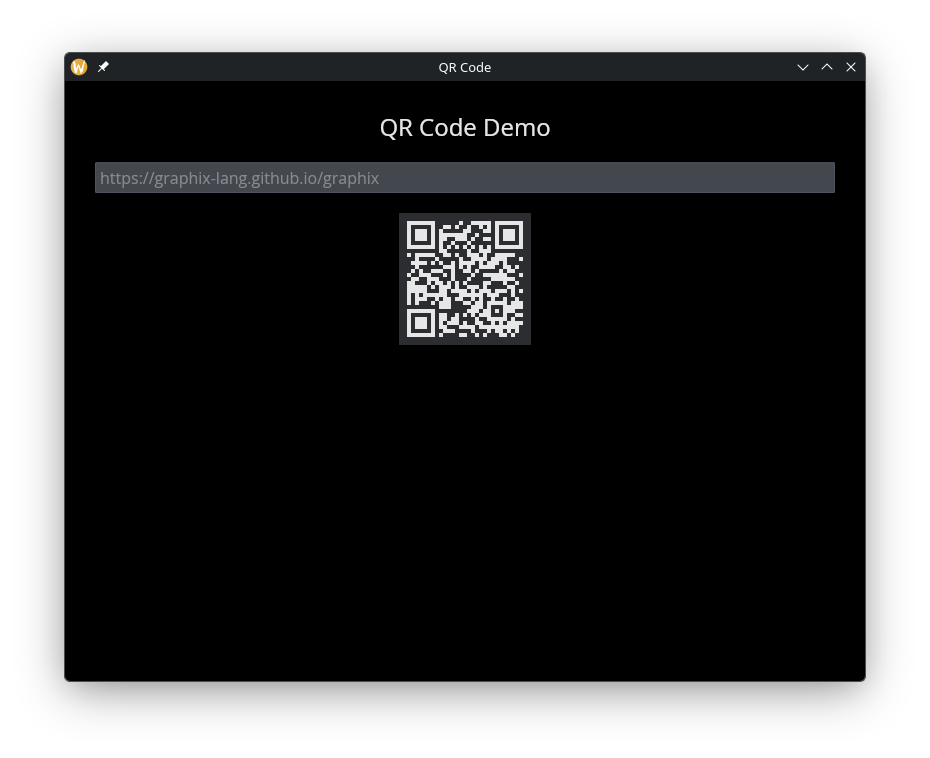
QR Code from Text Input
use gui::{
  window,
  column::column,
  qr_code::qr_code,
  text::text,
  text_input::text_input
};
mod icon;

let url = "https://graphix-lang.github.io/graphix";

let col = column(
    #spacing: &20.0,
    #padding: &`All(30.0),
    #halign: &`Center,
    #width: &`Fill,
    &[
        text(#size: &24.0, &"QR Code Demo"),
        text_input(
            #placeholder: &"Enter text...",
            #on_input: |v| url <- v,
            &url
        ),
        qr_code(#cell_size: &4.0, &url)
    ]
);

[&window(#icon: &icon::icon, #title: &"QR Code", &col)]